Meeting Notes
Case Study · AI Product · iOS App

My Role
My Role
Product Designer
Product Designer
Client
Client
Pentavalue
Pentavalue
Type
Type
AI product · UX · UI · Motion prototype
AI product · UX · UI · Motion prototype
Timeline
Timeline
2026
2026
Strategy
Research
UX/UI design
Design systems
Meeting Notes is an iOS AI assistant that joins your calls, writes the notes and turns every meeting into decisions and owned actions.
I designed the product end to end, from the core flows to the visual system and a motion prototype, then tested it with people in different roles to see whether it actually helps after the call ends.
Meetings produce decisions and next steps, but they end up in someone’s head or a scattered doc.
Afterwards nobody is sure what was decided, who owns what, or where to find it again.
Note taking competes with listening
Whoever writes the notes can’t fully take part in the conversation.
Decisions get buried
Outcomes hide inside long notes, chat threads and memory.
Follow-ups slip
Action items leave the call without an owner or a date.
An assistant that joins the call for you, so the team can stay in the conversation and leave with the decisions, the actions and who owns them.
Joins the call
Connected to the calendar, the assistant joins and records each meeting.
Captures and structures
The transcript becomes tagged notes and a short summary.
Turns it into action
Decisions, owners and dates, answers on demand and weekly insights. Works with Slack, Zoom, Notion and Jira.
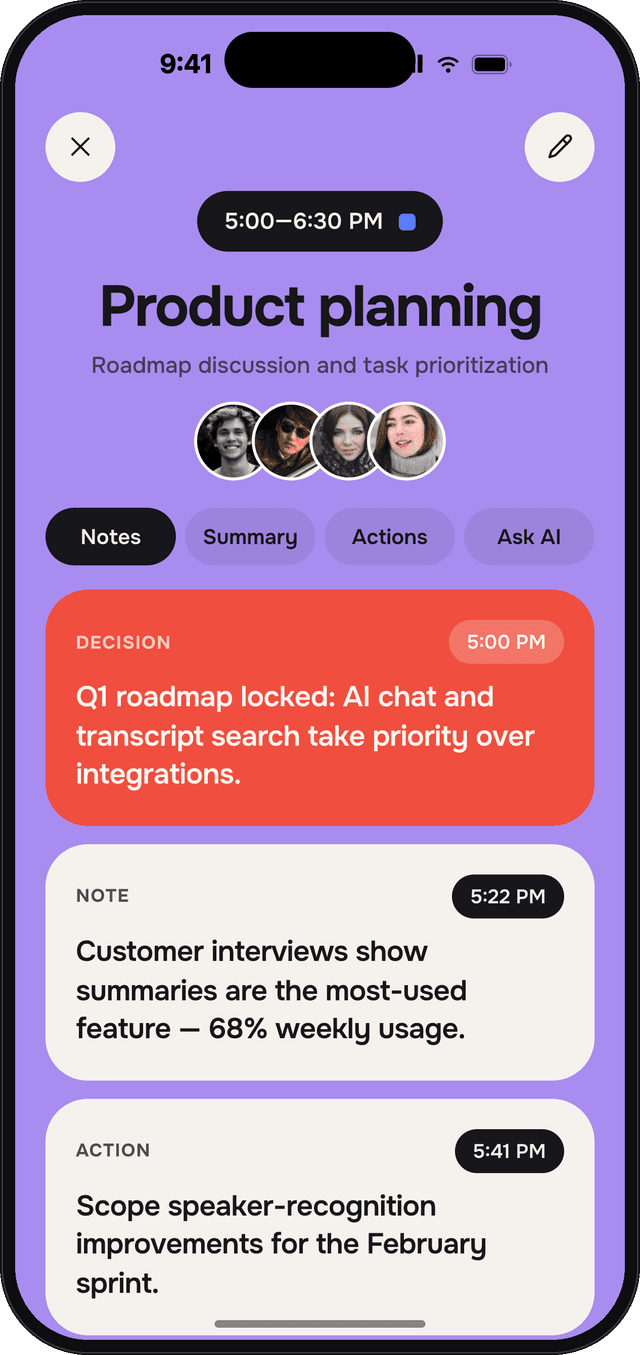
Stay in the conversation
The assistant joins the call and takes the notes, so everyone can listen and take part instead of typing.
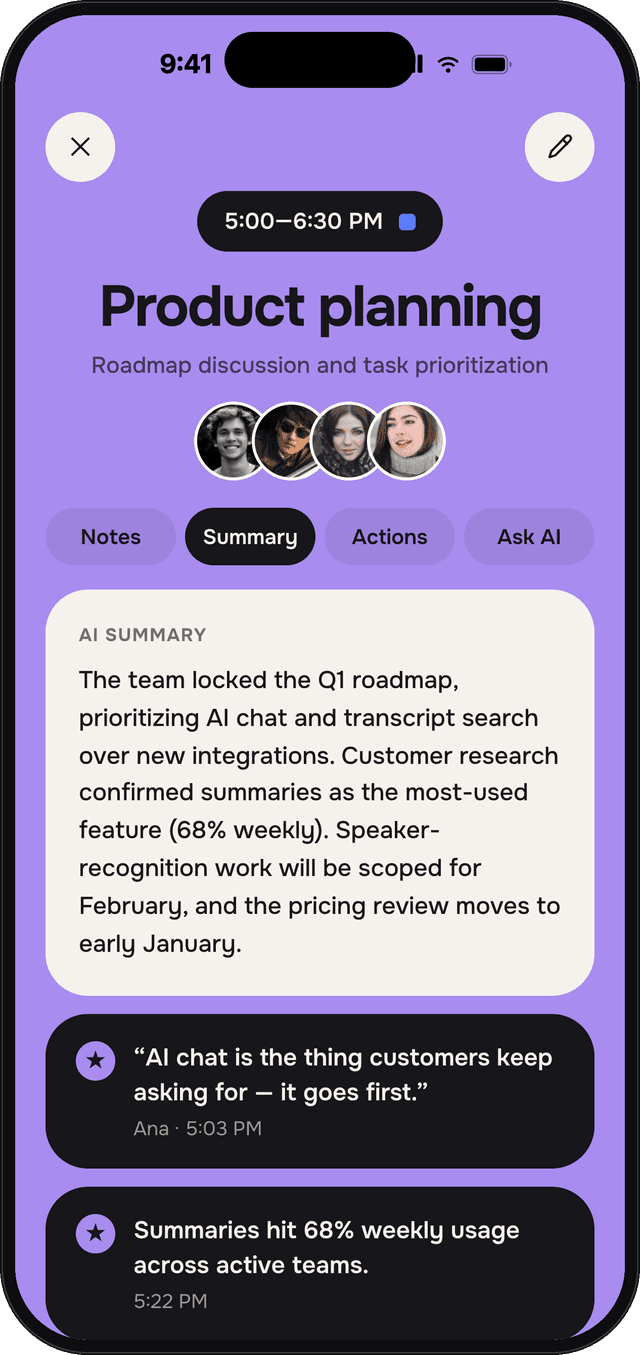
Know what was decided in seconds
A short AI summary and the quotes worth remembering replace reading back pages of notes.
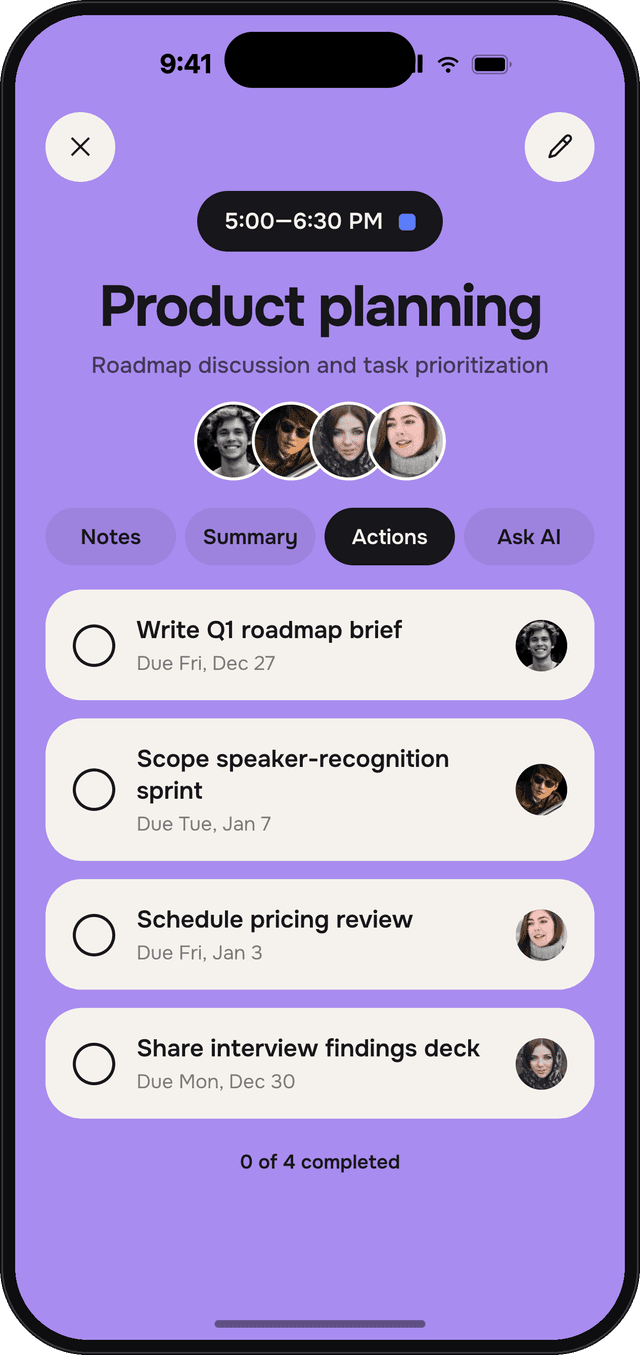
Leave with owners and dates
Action items come out of the call with who does what and by when, and their progress stays visible.
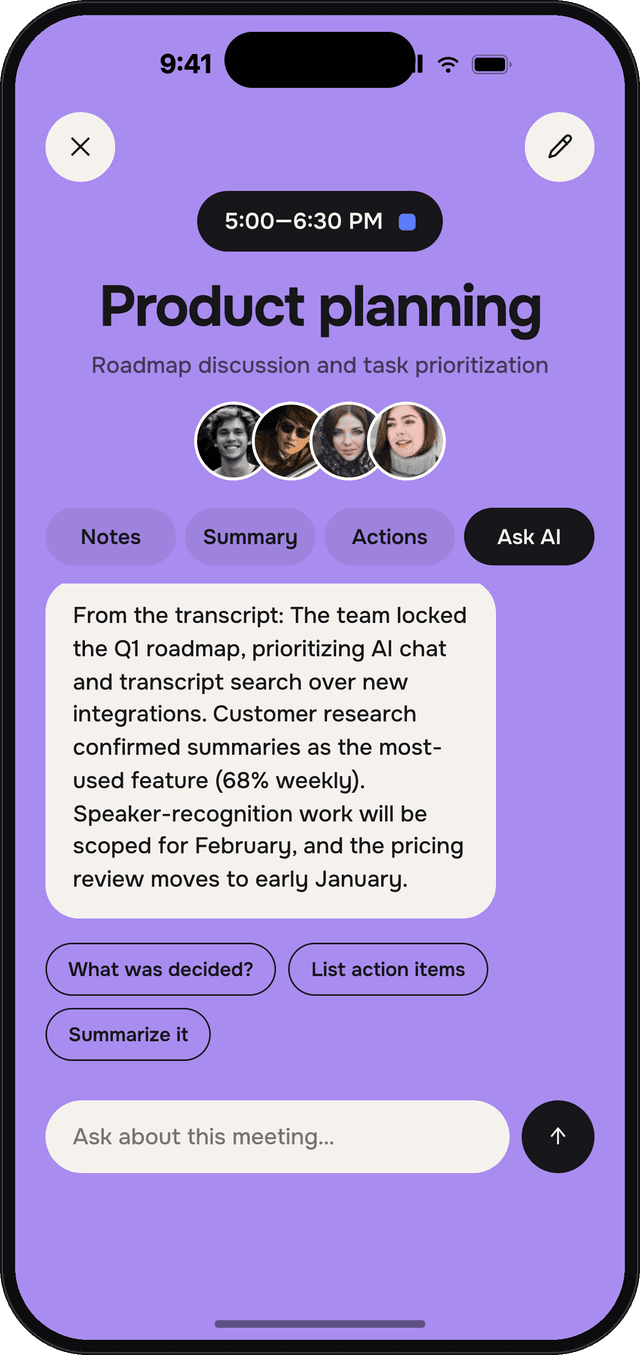
Get answers without replaying the call
Ask the meeting a question, or search decisions, people and topics across every meeting, then jump to the moment it was said.
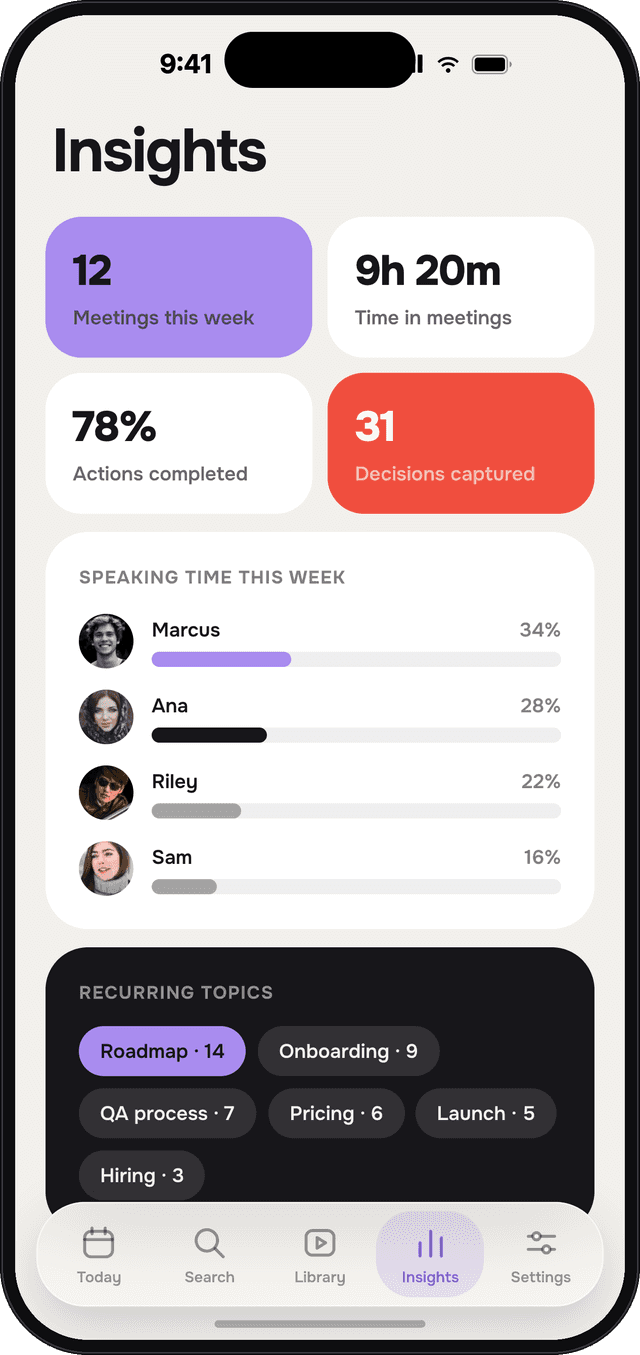
See where the team’s time goes
A weekly view of meetings, speaking time and recurring topics shows the patterns no single call reveals.
I tested the prototype with 10 people, each in a different role.
Participants
Different roles
Said it helped them
Every participant, 10 out of 10 across 10 different roles, said the app helped them.
Warm neutrals, one lavender family and a single red for what matters most.
Cards become screens
A meeting card expands into the meeting, keeping its colour and content in place.
Indicators slide
Tab and navigation indicators move between items instead of jumping.
Content arrives in order
Lists stagger in, so the eye reads top to bottom.
Meeting Notes
Case Study · AI Product · iOS App
My Role
My Role
Product Designer
Product Designer
Client
Client
Pentavalue
Pentavalue
Type
Type
AI product · UX · UI · Motion prototype
AI product · UX · UI · Motion prototype
Timeline
Timeline
2026
2026
Strategy
Research
UX/UI design
Design systems
Meeting Notes is an iOS AI assistant that joins your calls, writes the notes and turns every meeting into decisions and owned actions.
I designed the product end to end, from the core flows to the visual system and a motion prototype, then tested it with people in different roles to see whether it actually helps after the call ends.
Meetings produce decisions and next steps, but they end up in someone’s head or a scattered doc.
Afterwards nobody is sure what was decided, who owns what, or where to find it again.
Note taking competes with listening
Whoever writes the notes can’t fully take part in the conversation.
Decisions get buried
Outcomes hide inside long notes, chat threads and memory.
Follow-ups slip
Action items leave the call without an owner or a date.
An assistant that joins the call for you, so the team can stay in the conversation and leave with the decisions, the actions and who owns them.
Joins the call
Connected to the calendar, the assistant joins and records each meeting.
Captures and structures
The transcript becomes tagged notes and a short summary.
Turns it into action
Decisions, owners and dates, answers on demand and weekly insights. Works with Slack, Zoom, Notion and Jira.
Stay in the conversation
The assistant joins the call and takes the notes, so everyone can listen and take part instead of typing.
Know what was decided in seconds
A short AI summary and the quotes worth remembering replace reading back pages of notes.
Leave with owners and dates
Action items come out of the call with who does what and by when, and their progress stays visible.
Get answers without replaying the call
Ask the meeting a question, or search decisions, people and topics across every meeting, then jump to the moment it was said.
See where the team’s time goes
A weekly view of meetings, speaking time and recurring topics shows the patterns no single call reveals.
I tested the prototype with 10 people, each in a different role.
Participants
Different roles
Said it helped them
Every participant, 10 out of 10 across 10 different roles, said the app helped them.
Warm neutrals, one lavender family and a single red for what matters most.
Cards become screens
A meeting card expands into the meeting, keeping its colour and content in place.
Indicators slide
Tab and navigation indicators move between items instead of jumping.
Content arrives in order
Lists stagger in, so the eye reads top to bottom.
Meeting Notes
Case Study · AI Product · iOS App
My Role
My Role
Product Designer
Product Designer
Client
Client
Pentavalue
Pentavalue
Type
Type
AI product · UX · UI · Motion prototype
AI product · UX · UI · Motion prototype
Timeline
Timeline
2026
2026
Strategy
Research
UX/UI design
Design systems
Meeting Notes is an iOS AI assistant that joins your calls, writes the notes and turns every meeting into decisions and owned actions.
I designed the product end to end, from the core flows to the visual system and a motion prototype, then tested it with people in different roles to see whether it actually helps after the call ends.
Meetings produce decisions and next steps, but they end up in someone’s head or a scattered doc.
Afterwards nobody is sure what was decided, who owns what, or where to find it again.
Note taking competes with listening
Whoever writes the notes can’t fully take part in the conversation.
Decisions get buried
Outcomes hide inside long notes, chat threads and memory.
Follow-ups slip
Action items leave the call without an owner or a date.
An assistant that joins the call for you, so the team can stay in the conversation and leave with the decisions, the actions and who owns them.
Joins the call
Connected to the calendar, the assistant joins and records each meeting.
Captures and structures
The transcript becomes tagged notes and a short summary.
Turns it into action
Decisions, owners and dates, answers on demand and weekly insights. Works with Slack, Zoom, Notion and Jira.
Stay in the conversation
The assistant joins the call and takes the notes, so everyone can listen and take part instead of typing.
Know what was decided in seconds
A short AI summary and the quotes worth remembering replace reading back pages of notes.
Leave with owners and dates
Action items come out of the call with who does what and by when, and their progress stays visible.
Get answers without replaying the call
Ask the meeting a question, or search decisions, people and topics across every meeting, then jump to the moment it was said.
See where the team’s time goes
A weekly view of meetings, speaking time and recurring topics shows the patterns no single call reveals.
I tested the prototype with 10 people, each in a different role.
Participants
Different roles
Said it helped them
Every participant, 10 out of 10 across 10 different roles, said the app helped them.
Warm neutrals, one lavender family and a single red for what matters most.
Cards become screens
A meeting card expands into the meeting, keeping its colour and content in place.
Indicators slide
Tab and navigation indicators move between items instead of jumping.
Content arrives in order
Lists stagger in, so the eye reads top to bottom.